
Smart Check
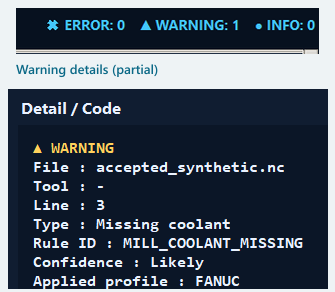
See the line number, reason, and severity of a flagged result.
GCode Pilot · CNC TECHNICAL ASSISTANT
For CNC operators, CAM programmers and manufacturing engineers.
Review NC programs, convert G-code, visualize programmed toolpaths, and measure STEP models on Windows.

GCode Pilot processes NC and CAD data directly on the Windows PC. Users control where technical data is stored, who can access it, and how it is shared.
FANUC / Robodrill milling example and one-way conversion to Mazak EIA.
Milling · Turning preview.
Sample .NC input, .EIA output, STEP measurement, and DXF units in the manual.
See the line number, reason, and severity of a flagged result.
Convert G-code with the applicable profiles and review the output.
Backplot the supported NC motion interpreted from the file.
Select an edge and read its dimension during setup prep.
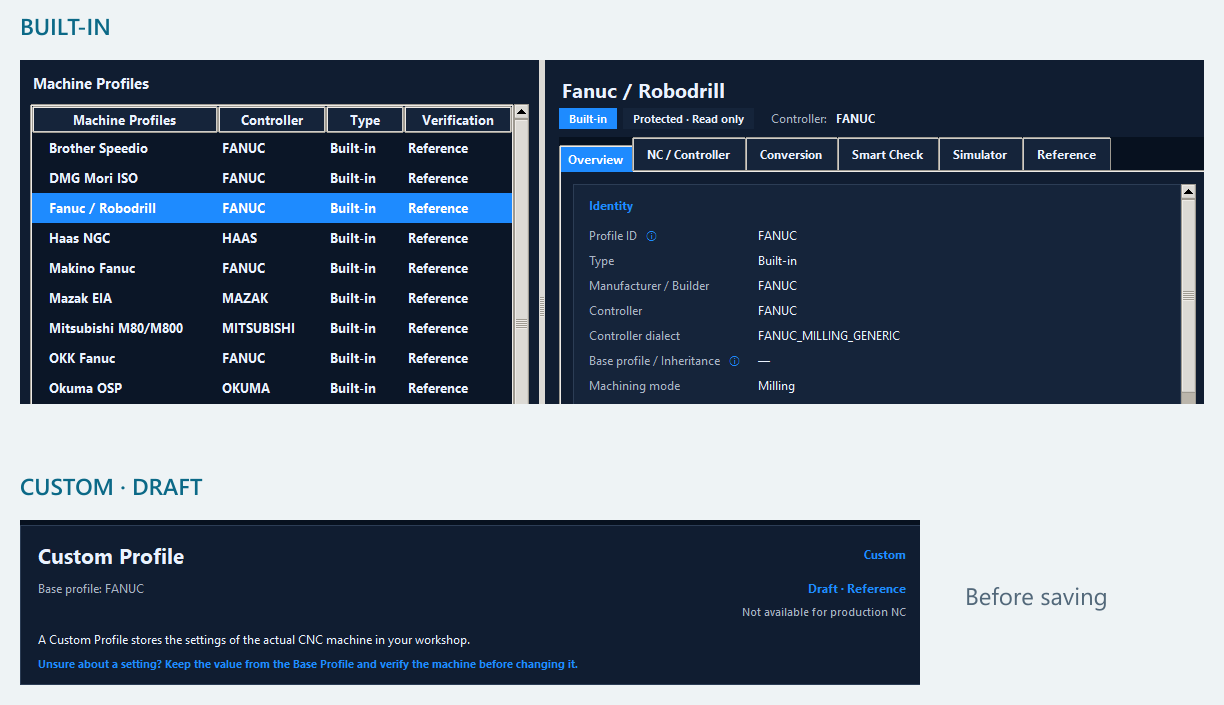
CNC machines follow different shop conventions. Machine Profile lets users set tool changes, work offsets, cycles, and coolant commands for the machine in use.
For example, compare the built-in FANUC profile’s G54 work offset with the work zero set on your machine.
Open and inspect the program before checking it against the actual setup.
Prepare a PDF job sheet to review, print, and hand over.
Check tolerances and fits, or calculate cutting speed and feed.
Use the experimental estimator to prepare inputs. The shop sets the quote.
Keep using CAM to program. Confirm the program, tools, stock and fixture at the machine before machining.
Simplify. Optimize. Take control of machining.
Check the scope for each module above. Include your machine model, controller and task when asking for help.
NC and CAD files are processed on your Windows PC.
Open Download for Windows x64 requirements and setup instructions. The Free edition has usage limits.
Windows x64 · Free edition available